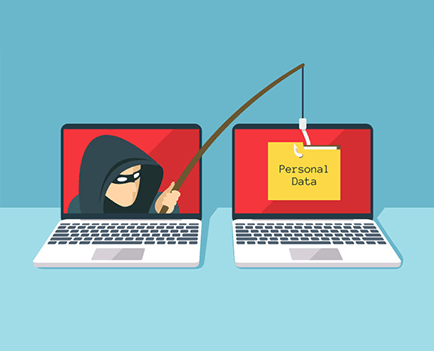
Phishing is a type of social engineering attack often used to steal user data, including login crzedentials and credit card numbers and also involves attempts by Internet fraudsters to access and obtain personal and sensitive information, such as usernames, passwords.It occurs when an attacker, masquerading as a trusted entity, dupes a victim into opening an email, instant message, or text message. The recipient is then tricked into clicking a malicious link, which can lead to the installation of malware, the freezing of the system as part of a ransomware attack or the revealing of sensitive information. For years, it continues to affect many users who still fall prey to tactics used to bait victims into disclosing personal identities and login credentials.here are several reasons why this type of threat is so dangerous. First of all, it is fairly inexpensive and easy to carry out. Phishing is a means of tricking e-mail recipients into opening an attachment that masquerades as being legitimate and urgent or into clicking on a malicious link that opens a website that is actually infected with malware.
Through this crime many people are affected and many business are on danger,but mostly of them are people that is part of a company that have big names or rank in their company. But we must be aware that phishers can target anyone to gain knowledge or personal information that can be used as a bait to you. Phishers target those people that have high profit in their companies or have high salary to their jobs. And the fact that most of the cyber crimes like this have the purpose to hacked and steal lots of money from people that is clueless of what they are doing or what they are clicking without even knowing or having the knowledge about phishing.
There are many ways in preventing or protecting yourself to phishing attacks:
1. Investigate every link’s final destination
We’re all email marketers here. Links, UTMs and redirects are sprinkled throughout every email we send. Same with emails that we receive. Just because a link is typed out and looks like a normal hyperlink doesn’t mean the destination is authentic.
To find out if a link is real, hover over it with your mouse and look at the link’s destination in the lower left corner of your browser. This is the real destination, regardless of what the text says.
2. Be cautious with shortened links
Scammers are like chameleons. They know how to mask their tactics by resembling actions that consumers are already familiar with… like shortening links.
Everyone’s clicked on a Bitly or Linktree link at some point—most likely on social media. Link shortening tools are popular for brands and users since they save character count and look cleaner than a long, messy slug.
Phishers are hip to this trend and employ it themselves. Watch out for shortened links anytime you’re tempted to click, as they might lead to a fake landing page.
3. Take “urgent” deadlines with a grain of salt
No legitimate company will ever ask for your personal data via email. If you see a message that’s trying to get you to take “urgent” action (aka, sending your personal info), call the company directly and ask. When it comes to your data, you’d rather be safe than sorry.
Always make account updates yourself or call the company using the number you find on their website (not the number the email provides—that could be fake too).When you know it’s a phisher, mark that b.s. as spam and send it to the trash where it belongs.
4. Look for the “s” in (https://)
Some websites start with http:// and others with https://. The “s” in the latter stands for secure and will show a little lock icon next to it. Those websites are safest for browsing and purchasing. Stick to secure websites whenever possible.
5. Change your passwords frequently
We know, we know. This can be a pain in the butt. “Don’t use the same password more than once,” they say. “Change them often,” they harp. Unless you work in IT or Security, you most likely use the same password, like your street name and kid’s birthday. The truth is, having a unique password for each account has never been easier.
There are reputable platforms available you can use to create strong passwords and store them for safekeeping, such as LastPass. Platforms like this one are seamless and reliable for keeping data secure.
6. Don’t allow remote access to your computer
Yep, it happens. Someone reaches out pretending to be from a well-known security firm and wants to help you install software protection on your computer.
1. Don’t install anything from an unverified source.
2. Especially don’t give that unverified source direct access to your computer. That’s a hard no-no.
7. Set up two-factor authentication
Many organizations offer two-factor authentication for an extra layer of security. Take advantage of this whenever possible so no one else can log in without needing your device.
8. Trust your gut instincts
If an email looks or feels off to you (even if you have very little reason to think so), trust your instincts. You’ve likely seen a garbage phishing email at some point, littered with typos and grammatical errors, unprofessional imagery, and just not a clean, crisp experience like you’d normally expect.
When an email or other interaction feels off to you, save yourself a potential headache and trust your gut.
9. Finally, use good judgement
This goes without saying, but it’s perfectly true. The best thing you can do to protect yourself against phishing attacks is plain and simple common sense.
Avoid the unknown. Don’t:
- Click unknown links
- Download unknown files or files from unknown sources
- Open attachments (even on social media) from untrusted sources
10. Report phishing attempts
In email, this is as easy as forwarding the poorly executed attempt to get your personal information to the proper authorities.
If You Think You’ve Been Scammed
Change your passwords immediately—email accounts, financial institutions, your computer login, Facebook, everything. The sooner you can lock them out and slow their progress, the better.
If you think your banking information is at stake, call your bank and let them know asap. They’ll be on high alert for odd account activity.
Use a trusted security software to scan and scrub malware from your computer.
posted by: JOHN LORD M. MANGILA
 Cyber Issue